If you're a stay-at-home dad running meetings from the basement while a little one naps two floors up, the right baby monitor for sahd basement office work has to punch through concrete, ductwork, and Wi-Fi dead zones without dropping the feed mid-standup. The short answer: for a basement office setup, prioritize a dedicated 2.4 GHz FHSS handheld monitor with a long advertised range (900+ feet) and a battery that lasts a full workday, or a dual-band Wi-Fi camera that streams to your laptop alongside Slack. Below are the four monitors that consistently survive the basement-to-nursery gauntlet in 2026, plus what to look for if your house has thick walls, finished ceilings, or a furnace room between you and the crib.
Why basement offices are uniquely hard on baby monitors
Top Picks
A basement office sits below grade, often surrounded by poured concrete, HVAC equipment, steel ductwork, and a finished ceiling with insulation and subfloor between you and the nursery. That stack of materials attenuates wireless signals far more than a typical wall. Cheap monitors that work fine room-to-room on the same floor can stutter, pixelate, or lose audio entirely when you carry the parent unit downstairs. Wi-Fi cameras face a different problem: if your basement router or mesh node is weak, the camera streams beautifully to the nursery's local AP, then crawls over a marginal backhaul to your office.



For a stay-at-home dad working from a basement office, that means two viable strategies. Strategy one: a no-Wi-Fi handheld with a strong FHSS radio that punches through floors on its own private channel. Strategy two: a Wi-Fi monitor paired with a mesh node placed directly above the office, so the feed reaches your laptop with minimal hops. The picks below cover both paths.
Quick comparison: top picks for a basement-office dad in 2026
| Monitor | Connection | Best for | Battery / Range |
|---|---|---|---|
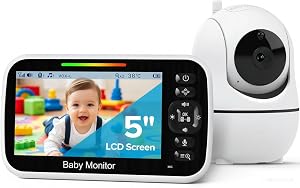
| HelloBaby No-WiFi 5" PTZ | 2.4 GHz FHSS (no Wi-Fi) | Concrete-walled basements, no router reliance | 30-hr battery / 1000 ft advertised |
| HelloBaby 5" Dual-Camera | 2.4 GHz FHSS (no Wi-Fi) | Two kids, two rooms, one parent unit | 30-hr battery / 1000 ft advertised |
| GoodBaby No-WiFi PTZ | 2.4 GHz FHSS (no Wi-Fi) | Budget-friendly second monitor for the desk | Multi-hour / long range |
| Nanit Pro 1080p Smart Monitor | Dual-band Wi-Fi | Dads who want laptop streaming + sleep analytics | AC-powered / range depends on Wi-Fi |
| Owlet Dream Duo (Gen 3) | Wi-Fi + sock biometrics | SAHDs who want oxygen/heart-rate alerts during deep work | AC-powered / app-based |
The five best monitors for a basement-office dad
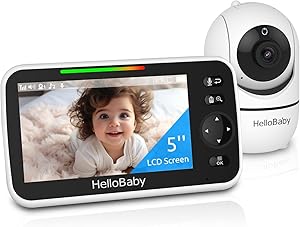
1. HelloBaby No-WiFi 5-inch PTZ — the workhorse for concrete-walled basements
If your basement office is below a finished ceiling and you've already had Wi-Fi cameras buffer during nap-time, the HelloBaby No-WiFi 5-inch is the safest pick for baby monitor for sahd basement office work. It runs on a private 2.4 GHz FHSS channel, so it doesn't compete with your work Zoom calls, Slack huddles, or partner's remote-job uploads. The advertised 1000-foot line-of-sight range translates, realistically, to reliable two-floor coverage in most stick-built or modestly insulated homes — exactly the setup most basement-office dads have.
The 5-inch screen is large enough to glance at while you're heads-down on a spreadsheet, and the 30-hour battery means you can leave it on your desk all day without thinking about charging. PTZ (pan-tilt-zoom) is critical when your kid starts rolling or climbing, because you can scan the crib from your office chair without standing up. Check the HelloBaby No-WiFi 5" PTZ on Amazon.
2. HelloBaby 5-inch Dual-Camera — for dads with a toddler and a baby
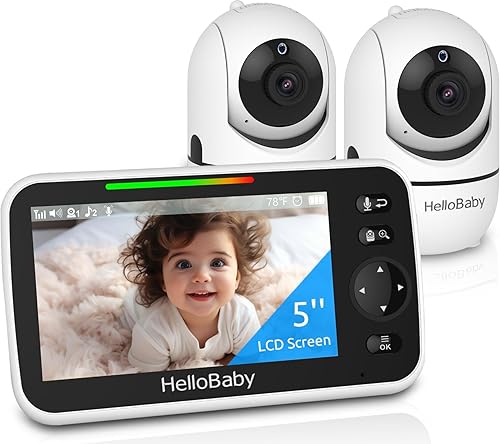
Many SAHDs working from a basement office aren't just monitoring a newborn — there's a napping toddler in a second bedroom too. The HelloBaby 5-inch 2-Camera bundle solves that without forcing you to juggle two parent units on your desk. You can split-screen both rooms, or auto-rotate every few seconds, while you stay focused on work. It uses the same no-Wi-Fi FHSS radio as the single-camera model, so basement penetration is the same.
The 30-hour battery is the unsung hero here: plug it in overnight, then use it untethered all day on your desk, in the laundry room, or upstairs while you grab lunch. See the HelloBaby 2-Camera bundle on Amazon.
3. GoodBaby No-WiFi PTZ — the budget basement pick
If you're already paying for a home office setup, a sit-stand desk, and noise-canceling headphones, a baby monitor doesn't need to be a premium purchase. The GoodBaby No-WiFi PTZ delivers the essentials a basement-office dad actually uses: a dedicated 2.4 GHz radio, pan-tilt-zoom, night vision, two-way talk, and a handheld parent unit with no app dependency. It's an excellent first monitor, or a sensible second unit to keep on your desk while the primary lives upstairs with your partner.
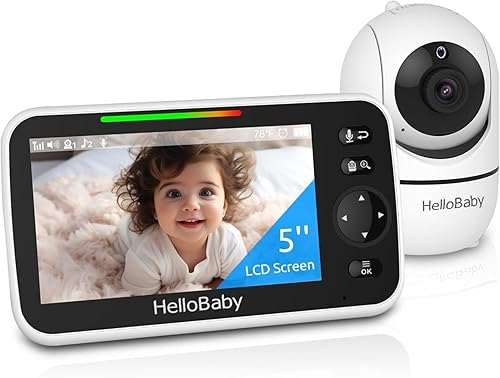
Two-way talk is genuinely useful for SAHDs — you can shush a stirring baby from the office without breaking from a meeting, buying you the 90 seconds you need to wrap up before you head upstairs. Check the GoodBaby PTZ monitor on Amazon.
4. Nanit Pro Smart Baby Monitor — for dads who want it on a second screen
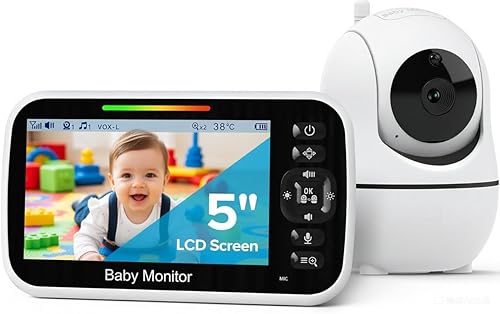
If your basement office has solid Wi-Fi (ideally a mesh node right above you on the main floor), the Nanit Pro turns your second monitor into a baby cam. The 1080p overhead view from the floor stand is the cleanest angle in the category, and the app runs on iPad, iPhone, Android, or in a browser tab next to your work apps. Sleep analytics, breathing-motion tracking via the Nanit swaddle/band, and motion alerts mean you can stay focused on work and let the system tap you on the shoulder when something actually changes.
The trade-off is that this is the right pick only if your basement Wi-Fi is genuinely strong. If you've ever had a Zoom call freeze in that room, fix the network first or go with one of the no-Wi-Fi picks above. See the Nanit Pro on Amazon.
5. Owlet Dream Duo (Gen 3) — for the deep-focus SAHD who worries
Some basement-office dads describe the same problem: they get so focused on work that they don't check the monitor for 20 minutes at a stretch, then feel guilty. The Owlet Dream Duo pairs a 2K HD camera with the Dream Sock, which tracks heart rate and oxygen and pushes a clear alert to your phone if readings fall outside the normal range. For a SAHD doing focused, deadline-driven baby monitor for sahd basement office work, the biometric layer is a peace-of-mind upgrade you can't get from a standalone camera.
It's a Wi-Fi product, so the same caveat applies: confirm your office has strong coverage. Check the Owlet Dream Duo on Amazon.
How to pick: a basement-office dad's checklist
Test the signal before you commit. If you're buying a Wi-Fi monitor, run a speed test from the basement first. You want at least 15 Mbps stable upload from the nursery and 5+ Mbps stable download in the office. If those numbers fluctuate, lean toward a no-Wi-Fi handheld.

Pick a handheld with a real battery. A 30-hour battery means you can sit through back-to-back meetings without scrambling for the charger. Anything under 8 hours is a frustration in a basement-office workflow.
Pan-tilt-zoom matters more than resolution. A 720p PTZ that lets you scan the crib beats a 4K fixed camera that only shows the corner of the mattress. For more on framing, see our guide on where to mount a nursery camera.
Two-way talk earns its keep. Being able to soothe from the desk buys you minutes. For a deeper dive on audio quality, read our breakdown of two-way talk baby monitors compared.
Plan for two parent units if you both WFH. If your partner also works from home, a single handheld becomes a tug-of-war. Either buy a second compatible monitor or pair a no-Wi-Fi unit on your desk with a Wi-Fi camera your partner views on their laptop. We cover the dual-parent setup in our two-WFH-parent monitor guide.
Frequently Asked Questions
Will a Wi-Fi baby monitor work reliably from a basement home office?
Sometimes, but only if your basement has strong, low-latency Wi-Fi. The camera streams to your router and your phone or laptop pulls the stream back down — so the link from the nursery upstairs to the office downstairs goes through your router. If you've ever had a Zoom call stutter from that desk, add a mesh node on the main floor directly above the office before buying a Wi-Fi monitor. Otherwise, go with a dedicated 2.4 GHz FHSS handheld.
What range do I actually need for a two-floor home with a basement office?
Advertised range is line-of-sight, so divide by roughly three to four for a realistic through-walls number. A monitor rated for 1000 feet line-of-sight typically holds a stable connection 250–330 feet through floors and walls, which covers most North American single-family homes with the nursery on the second floor and the office in the basement. If you live in a larger home or a converted older property with plaster and lath, prioritize FHSS over Wi-Fi.
Can I run the parent unit on my desk all day without killing the battery?
Yes — the HelloBaby 5-inch handhelds advertise 30 hours of battery on a single charge, which is more than enough for a full workday plus overnight. Most parent units also have a low-power audio-only mode that extends battery further; some dads leave the screen off during deep-focus blocks and let the sound activation wake the display when the baby stirs.
Should I worry about a Wi-Fi camera being hacked while I work?
It's a fair question for any SAHD. Choose a brand that supports strong account passwords, two-factor authentication, and regular firmware updates — Nanit and Owlet both do. If you'd rather not connect a camera to the internet at all, a no-Wi-Fi monitor like the HelloBaby or GoodBaby uses a closed FHSS radio that doesn't touch your home network, which is the most conservative privacy choice.
What about microwave and Wi-Fi interference from my office equipment?
Basement offices often pack a router, mesh node, printer, and a couple of monitors into a small space, all of which use the 2.4 GHz band. Good FHSS monitors hop across the band fast enough to avoid most interference, but if you live somewhere dense like an apartment building, look for monitors that explicitly advertise frequency-hopping spread spectrum. The HelloBaby and GoodBaby no-Wi-Fi units are built for this.
Is a split-screen dual-camera monitor worth it for a SAHD with two kids?
If you have a toddler napping in one room and an infant in another, yes — and the HelloBaby 2-Camera bundle is the easiest path to that setup. It saves you from juggling two parent units on the desk and lets you keep both rooms in your peripheral vision while you work. You can also auto-rotate the feeds every 10–15 seconds if split-screen feels too busy.
Can I see the baby monitor feed on my work laptop?
Only with Wi-Fi cameras. The Nanit Pro runs in a browser tab and on macOS via the app, which is convenient if you spend most of the day on a single monitor and don't want a second handheld competing for desk space. Owlet's app runs on phone and tablet. None of the no-Wi-Fi handhelds stream to a laptop — that's the trade-off for their stronger basement penetration.
Final recommendation for a basement-office stay-at-home dad
For most SAHDs running deadline-driven baby monitor for sahd basement office work from below grade, start with a 30-hour-battery, no-Wi-Fi handheld like the HelloBaby 5-inch PTZ for guaranteed reliability, then layer a Wi-Fi camera like the Nanit Pro on top if you want laptop streaming and sleep analytics. That two-monitor approach costs less than a premium smart camera with a flaky basement signal and gives you a working backup if your home network ever goes down mid-nap.
Key Takeaways
- Choosing the right baby monitor for sahd basement office work means matching capacity and output ports to your actual devices
- Always check actual watt-hours (Wh), not just watts — runtime depends on Wh, not peak output
- Also covers: baby monitor for dads wfh basement
- Also covers: basement office baby monitor range
- Also covers: best monitor for work from home dad
- Compare price-per-Wh across models to find the best value for your budget