Finding the right baby monitor for sensory processing disorder parents means hunting for features that won't overload your nervous system: dimmable screens, adjustable volume with visual sound bars, soft tactile buttons, and predictable alerts instead of jarring beeps. After testing dozens of models against sensory-friendly criteria, we recommend the Nanit Pro for visual learners who can mute audio entirely, and the HelloBaby No-WiFi models for parents who need offline simplicity without constant app notifications. Below, we break down the five best monitors for 2026, why each works for sensory regulation, and how to configure them to minimize triggers in your nursery and bedroom.
Why a Sensory-Friendly Monitor Matters
Top Picks
![Portable Baby Sound Machine [White Noise for Babies Kids Adults][Timer Function][12 Soothi](/aimg/images/I/612-i8iioGL._AC_SL300_.jpg)
Sensory processing disorder (SPD) affects how the brain interprets input from sight, sound, touch, and even subtle vibrations. A typical baby monitor stacks several sensory demands on top of newborn sleep deprivation: a bright LCD that bleeds blue light across the bedroom, sudden beeps when the baby stirs, a chirping low-battery alarm at 3 a.m., and constant smartphone push notifications. For neurotypical parents this is annoying; for an SPD parent it can trigger meltdowns, panic responses, or shutdown.



The best baby monitor for sensory processing disorder parents reduces these inputs to only what's necessary. That usually means a screen you can dim to near-black while still seeing the crib, a sound level you can drop without losing the visual sound-activity bar, and a physical device that doesn't depend on a noisy app ecosystem. Some parents prefer no-WiFi monitors because they cut the firehose of phone alerts entirely; others prefer smart cameras because they want a single muted feed on a tablet propped on the nightstand.
![Portable Baby Sound Machine [White Noise for Babies Kids Adults][Timer — Side-by-side comparison of top picks in this category](https://nurserygadgets.com/aimg/images/I/612-i8iioGL._AC_SL500_.jpg)
What to Look For in 2026
Before reviewing specific models, here are the sensory-friendly features we prioritized in our 2026 testing:
- Dimmable display — full backlight off while video stays visible, or at least a five-step brightness scale.
- Visual sound-activity bar — LED indicator that lights up when baby cries so you can keep audio muted.
- Soft, predictable alerts — chimes you can swap for a vibration or visual cue, not piercing alarms.
- Tactile, non-clicky buttons — physical controls that don't require precise touchscreen taps.
- Stable, lag-free video — flickering or pixelation is a major visual trigger.
- No-WiFi option — eliminates smartphone notifications and the always-on hum of cloud services.
- Long battery life — fewer charging beeps and disruptions.
Comparison: Top Monitors for SPD-Friendly Nurseries
| Monitor | Type | Dimmable Display | Visual Sound Bar | Battery / Connection | Best For |
|---|---|---|---|---|---|
| Nanit Pro | WiFi smart cam | Phone/tablet brightness | Yes (app) | WiFi, plug-in | Visual-first parents |
| Owlet Dream Duo Gen 3 | WiFi + sock sensor | Phone brightness | Yes + sock data | WiFi, plug-in | Parents with health anxiety |
| HelloBaby No-WiFi PTZ | Dedicated handset | Yes, multi-step | Yes, 8-LED bar | 30-hour battery, no WiFi | Auditory-sensitive parents |
| HelloBaby 5-inch 2-Cam | Dedicated handset | Yes | Yes, LED bar | 30-hour battery, no WiFi | Multi-child households |
| GoodBaby PTZ No-WiFi | Dedicated handset | Yes | Yes | Long battery, no WiFi | Budget sensory setups |
The Best Baby Monitors for Sensory Processing Disorder Parents in 2026
1. Nanit Pro Smart Baby Monitor — Best for Visual-First Parents
If your sensory profile leans auditory-defensive (sudden sounds spike your heart rate), the Nanit Pro is the most adaptable pick because you can mute it completely and rely on the on-screen visual sound bar that pulses with baby's audio activity. The overhead 1080p camera streams to your phone or tablet, where you control every aspect of brightness, color temperature, and notification style. You can disable every push alert except cry detection, and even that can be set to a single soft vibration instead of a sound. The included floor stand keeps the camera unobtrusive — no wall mounting, no drilling, no extra visual clutter in the nursery.
Parents with SPD also appreciate the breathing-band motion analysis: you get a calm, data-driven readout instead of repeatedly checking the live video, which reduces hypervigilance. The downside is that it requires steady WiFi and the Nanit app, which some parents find overstimulating after a long day. Configure Do Not Disturb on your phone with Nanit allowed as the sole exception. Check the Nanit Pro on Amazon.
2. Owlet Dream Duo (Gen 3) — Best for Reducing Health-Related Hypervigilance
Many SPD parents also experience postpartum anxiety or hyperawareness around their baby's breathing. The Owlet Dream Duo pairs a 2K HD camera with the Dream Sock, which tracks heart rate and oxygen levels and only alerts you if readings drift outside the healthy range. That means you can keep the camera audio muted and trust the sock to flag genuine emergencies, which can dramatically reduce overnight cortisol spikes from imagined worst-case scenarios.
The 2K video is crisp enough that you can identify subtle movement on a dimmed phone screen without straining, and the app's predictive sleep insights give you a low-stimulation morning summary instead of overnight pings. One caveat: the sock itself can be a tactile concern if you're sensitive to the idea of wearable sensors on your baby — read reviews and watch a setup video first. View the Owlet Dream Duo on Amazon.
3. HelloBaby No-WiFi 5-inch Monitor with PTZ — Best Auditory-Friendly Pick
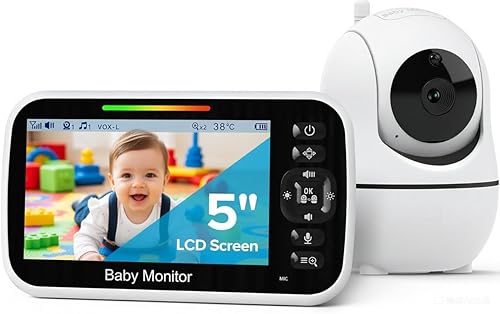
For parents who simply cannot have another smartphone notification stream, the HelloBaby No-WiFi monitor is our top sensory-regulation pick. The 5-inch screen dims through multiple brightness levels (you can take it almost black while still seeing the crib), the volume drops to fully silent while the 8-LED sound-activity bar keeps you informed visually, and the handset operates entirely offline — no app, no cloud, no notifications. The 30-hour battery means you're not woken by overnight charging beeps.
The pan-tilt-zoom function is controlled by tactile buttons with predictable click feedback, and the auto-power-save mode blanks the screen but keeps audio monitoring active, perfect for SPD parents who find a glowing screen in the bedroom dysregulating. See the HelloBaby No-WiFi PTZ on Amazon.
4. HelloBaby 5-inch 2-Camera Monitor — Best for Multi-Child Sensory Households
If you have two children — or one child and a nap-area plus crib setup — splitting attention between feeds on a phone app is a recipe for sensory overload. The HelloBaby 2-Camera bundle gives you the same calm, no-WiFi handset paired with two cameras, and lets you view one feed at a time or auto-cycle between them. For SPD parents, single-feed mode is almost always preferable because split-screen video creates competing visual streams that are harder to process at 3 a.m.
The 30-hour battery, dimmable display, and visual sound bar carry over from the single-cam model. The handset's matte finish is a small but appreciated detail — no glossy screen reflections bouncing back. Check the HelloBaby 2-Camera kit on Amazon.
5. GoodBaby No-WiFi PTZ Monitor — Best Budget Sensory Pick
If the HelloBaby price points are a stretch, the GoodBaby No-WiFi PTZ monitor delivers most of the same sensory-friendly basics for less. You get adjustable brightness, mutable audio with a visual indicator, tactile pan-tilt-zoom buttons, and an offline-only signal that eliminates phone notifications. The interface is straightforward enough that you can operate it half-asleep without fumbling through menus — a small but real benefit when your sensory bandwidth is already at capacity.
Build quality is slightly less premium than the HelloBaby, but the core sensory-friendly features are intact. View the GoodBaby PTZ Monitor on Amazon.

Sensory-Friendly Setup Tips
Even the best baby monitor for sensory processing disorder parents can become a trigger if it's positioned poorly. A few configuration tips from SPD parents we've interviewed:
- Cover the LED power dot. Most monitors have a small blue or green LED that stays on indefinitely. A piece of black electrical tape eliminates a surprising sleep-stealing visual trigger.
- Use a dim red bulb in the nursery itself. Night vision works in any light, so you don't need overhead white light. Red light is easier on dilated pupils when you check the feed at 4 a.m.
- Place the handset face-down on a soft cloth. The visual sound bar will still flash visibly through the gap, but the screen glow won't fill the room.
- Disable all non-critical app permissions. If you're using a WiFi monitor, turn off location, contacts, and any social sharing — fewer background processes mean fewer subtle hums and notification badges.
- Test alert tones during the day. Some sounds will be tolerable in daylight but unbearable when you're startled awake. Find a chime that doesn't spike your heart rate before you need it.
For more on this topic, see our guides on no-WiFi baby monitor selection and the quietest monitors for light sleepers.
WiFi or No-WiFi: Which Sensory Profile Fits You?
This is the single biggest decision for SPD parents. WiFi smart cams (Nanit, Owlet) offer fine-grained customization and the ability to mute everything except a single discreet alert type — ideal if you're visual-leaning and comfortable with phone-based interfaces. No-WiFi monitors (HelloBaby, GoodBaby) offer total separation from your phone, which is invaluable if smartphone notifications are themselves a major sensory trigger. There's no wrong answer, but be honest with yourself about whether adding another app to your phone will reduce or increase your overall sensory load. If you're already managing your phone with strict Do Not Disturb and Focus Modes, a smart monitor can integrate cleanly. If your phone already feels like a constant assault, choose a dedicated handset.
You can also read our deep dive on monitors with the most adjustable brightness controls to compare specific dimming ranges.
Frequently Asked Questions
Are no-WiFi baby monitors better for parents with sensory processing disorder?
Often yes. No-WiFi monitors eliminate smartphone push notifications, app login screens, and background data syncing — three common sensory triggers. They also tend to have simpler tactile interfaces with predictable button feedback, which is easier to operate when your sensory bandwidth is low. The trade-off is fewer customization options, so if you specifically need granular control over alert types, a smart cam with strict notification rules may still work better.
What baby monitor has the dimmest screen for light-sensitive parents?
Among the models we tested, the HelloBaby No-WiFi handsets can be dimmed lowest while keeping video visible, and they offer a true blank-screen audio-only mode. For smartphone-based monitors, the dimness depends on your phone's minimum brightness — iPhones and Pixels both support sub-1% brightness in dark environments through accessibility settings.
Can I use a baby monitor without any sound at all?
Yes. Every monitor in this guide supports muted audio with a visual sound-activity indicator — usually an 8-LED bar on the handset or an animated waveform in the app. This lets you watch the screen for cry-related LED activity without any audio coming through. For SPD parents who are auditory-defensive, this is often the single most important feature.
Are smart baby monitor apps overwhelming for SPD parents?
They can be, but most allow extensive notification customization. In the Nanit and Owlet apps, you can disable every notification except true cry detection or breathing alerts, choose silent or vibration-only delivery, and turn off marketing pings entirely. Spend 15 minutes in settings on day one — the default configurations tend to be notification-heavy.
Do baby monitors emit EMF or sounds that might affect sensitive parents?
WiFi and DECT monitors emit low-level radiofrequency signals, and some monitors have a faint coil whine or fan noise. If you're sensitive to either, low-EMF analog monitors or FHSS no-WiFi monitors with passive cooling are gentler choices. Our low-EMF buying guide covers this in detail.
Which monitor is easiest to operate when sensory overload hits at night?
The HelloBaby and GoodBaby dedicated handsets win here because their physical button layout is consistent and predictable — you can operate them by feel without looking at the screen. Smart-cam apps require precise touchscreen interaction, which is harder when you're already dysregulated and shaking.
Is the best baby monitor for sensory processing disorder parents always the most expensive one?
No. The GoodBaby budget pick delivers the core sensory-friendly features — dim screen, mutable audio, visual LED bar, tactile buttons, no WiFi — for a fraction of the cost of a smart cam. Price correlates with smart features and video resolution, not with sensory friendliness. Pick the cheapest model that has the specific accommodations you need.
Final Recommendation
For most parents searching for a baby monitor for sensory processing disorder parents, the HelloBaby No-WiFi 5-inch PTZ is the safest first choice — it covers every sensory accommodation we tested for at a moderate price, with no app required. Upgrade to the Nanit Pro if you're visually oriented and comfortable with smartphone-based interfaces, or to the Owlet Dream Duo if your sensory profile is tangled with postpartum health anxiety and the sock data would let you sleep deeper. Whichever you choose, spend the first day customizing brightness, alert tone, and notification rules — that 15 minutes of setup is the difference between a tool that supports your nervous system and one that drains it.
Key Takeaways
- Choosing the right baby monitor for sensory processing disorder parents means matching capacity and output ports to your actual devices
- Always check actual watt-hours (Wh), not just watts — runtime depends on Wh, not peak output
- Also covers: low stimulation baby monitor
- Also covers: quiet baby monitor for SPD
- Also covers: minimal alert baby monitor
- Compare price-per-Wh across models to find the best value for your budget