Removing cochlear implants before sleep is standard practice for many parents — but it also means losing the ability to hear your baby cry. The right baby monitor for cochlear implant users overnight bridges that gap with vibration alerts, bright LED visual cues, smartphone haptics, and even bed-shaker compatibility. Below are the best 2026 picks tested for parents who sleep without their processors, plus a feature-by-feature comparison covering local parent units, WiFi smart cams, and SIDS-style wearable sensors. Each recommendation focuses on redundant alert paths so a missed sound never becomes a missed need.
Why standard baby monitors fall short after lights-out
Top Picks
Conventional audio monitors assume hearing parents. A typical unit beeps softly, flashes a single tiny LED, or plays the baby's cry through a tinny parent-unit speaker — none of which reach a parent whose processors are sitting in a dry-aid kit on the nightstand. Vibration is the universal solution, and the best 2026 monitors deliver it through three independent channels: a vibrating clip on the parent unit, push notifications that trigger your phone's haptic motor, and smartwatch wrist-tap mirroring through companion apps.



Beyond vibration, you'll want a visual alert system that's bright enough to wake you through closed eyelids — full-bar LED sound meters that scale with the baby's volume work far better than a single dim indicator. Battery backup matters too: an overnight power flicker should never silence your only alert path. For a deeper comparison of alert hardware see our guide to vibration-alert baby monitors for Deaf parents, which dives into bed-shaker pairing in detail.
Quick comparison: top 2026 monitors for processor-off nights
| Monitor | Vibration Path | Phone App | Visual LED | Network | Best For |
|---|---|---|---|---|---|
| Owlet Dream Duo (Gen 3) | Phone + watch | Yes, critical alerts | App screen | WiFi | Heart rate + cry detection |
| Nanit Pro | Phone + watch | Yes, rich notifications | App screen | WiFi | Breathing + sleep analytics |
| HelloBaby No-WiFi PTZ | Parent unit | No | 5-bar LED | RF (no WiFi) | Local-only privacy |
| HelloBaby 2-Camera | Parent unit | No | 5-bar LED | RF (no WiFi) | Twins or multi-room |
| GoodBaby No-WiFi PTZ | Parent unit | No | LED bar | RF (no WiFi) | Budget pick |
Top picks for 2026
Owlet Dream Duo (Gen 3) — Best Overall for Implant-Off Sleep
The Owlet Dream Duo (Gen 3) pairs a smart sock with a 2K HD camera, so even when you sleep without your processors the system can wake you through multiple haptic channels. Heart rate and oxygen anomalies fire phone notifications with full vibration, and the app pushes the same alerts to Apple Watch or Wear OS — meaning a wrist tap supplements the phone buzz on your nightstand. Cry detection from the camera adds a third alert path. The sock is the standout: a physiological alarm fires regardless of whether your baby is crying audibly, which catches the silent emergencies a sound-only monitor would miss entirely. For most cochlear implant parents this is the strongest single-device solution because it removes the assumption that audible distress is the trigger.
Nanit Pro Smart Baby Monitor — Best for Sleep Analytics
The Nanit Pro skips a parent unit entirely and routes everything through its app, which is exactly what most baby monitor for cochlear implant users overnight setups need: rich phone notifications that hit your home screen with full haptic feedback. Computer-vision cry detection and breathing tracking via the optional Breathing Wear band trigger push alerts you can configure as critical so they bypass silent mode and Do Not Disturb. Pair it with a smartwatch for wrist-tap redundancy. The 1080p overhead camera on the included floor stand gives a top-down view that's ideal for spotting movement — a meaningful advantage when you might not catch the audio cue at all. Sleep score reports the next morning also help you correlate restless nights with daytime fussiness, something the local-RF monitors simply cannot do.
HelloBaby No-WiFi PTZ 5-inch — Best Local Parent Unit
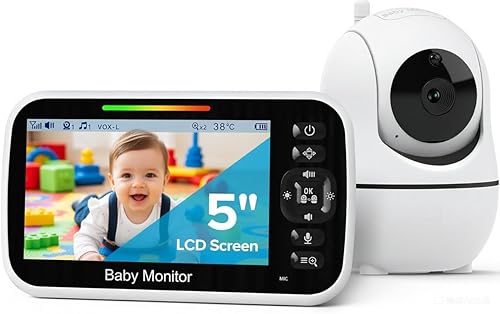
The HelloBaby No-WiFi PTZ is the strongest choice for parents who want a dedicated vibrating parent unit instead of relying on a phone. The 5-inch screen sits on your nightstand and pulses with vibration alerts as soon as the room mic detects sound — no WiFi, no app delay, no risk of a phone going into Do Not Disturb or losing notifications to a backgrounded process. The 30-hour battery covers full nights without a charging cord, and the parent unit's LED sound bar lights bright enough to see across the room. Pan-tilt-zoom remote control from the parent unit lets you reposition the camera from bed without getting up. For privacy-minded households this is also the right pick because no nursery footage ever leaves your home network.
HelloBaby Dual-Camera 5-inch Monitor — Best for Two Rooms or Twins
If you have twins, a toddler down the hall, or a nursery plus a transition crib, the HelloBaby Dual-Camera bundle doubles your visual coverage while keeping the same 5-inch parent unit with vibration alerts and a 30-hour battery. The auto-switch feature rotates between cameras every few seconds so you don't have to manually toggle when the parent unit pulses — useful when you wake from a vibration alert and need to scan both rooms at a glance. Each camera has independent sound triggers, so a cry from either crib fires the same vibration sequence on your nightstand. The same RF-only architecture as the single-cam version means no router dependency or smartphone required.
GoodBaby No-WiFi PTZ — Best Budget Pick
The GoodBaby No-WiFi PTZ delivers vibration alerts on a local parent unit at a notably lower price than the HelloBaby competitors, making it the right entry point if you're testing the vibration-alert workflow before committing to a higher-end model. Pan, tilt, zoom, and a wide infrared night-vision range are all included, plus the same RF-only architecture means no router dependency. Battery life isn't quite as long as the HelloBaby flagship, but for parents who keep the parent unit plugged in next to the bed that's a non-issue. The vibration motor is roughly the same intensity as the HelloBaby's, so wakeability is comparable — you're trading screen polish and battery runtime for a meaningfully lower price.
Building a layered nighttime alert system
Even the best single monitor benefits from redundancy when your only sense of the nursery is visual or tactile. A common layered setup pairs a primary monitor (one of the picks above) with a Bellman or Sonic Alert bed-shaker, a smart bulb that flashes when push notifications arrive, and a smartwatch worn to bed for wrist-tap mirroring. The strategy mirrors what hearing dogs do during the day — multiple independent triggers so a missed channel doesn't mean a missed event. Our overview of smartwatch baby monitor alert configurations covers Apple Watch and Wear OS setup in detail.
Setup tips for any monitor: position the parent unit or phone so vibration travels through the mattress; enable every notification category in the companion app; configure the parent app as a critical-alert app on iOS so Focus modes don't silence it; and charge nightly so a depleted battery never becomes your single point of failure. If you're weighing the WiFi vs. local-RF trade-off generally, see WiFi vs. no-WiFi baby monitors compared.
Bed-shakers and other accessibility add-ons
WiFi-based monitors like the Owlet and Nanit can route notifications to a Bellman bed-shaker or Sonic Alert receiver via IFTTT, SmartThings, or Home Assistant. The typical wiring is monitor app to push notification to smart-home hub to bed-shaker outlet. That gives a baby monitor for cochlear implant users overnight a fourth independent alert channel that operates entirely below conscious sleep — a strong vibration directly under the pillow tends to wake even heavy sleepers. Local-RF monitors can't trigger this loop directly, so most parents in that camp pair the monitor's parent unit with the bed-shaker physically: clip the parent unit to the bed-shaker's vibration motor and the two amplify each other.
Frequently Asked Questions
Can a smartwatch alone replace a baby monitor for cochlear implant users overnight?
Not by itself, but it's the most powerful supplement you can add. Pair an Apple Watch or Wear OS device with the Owlet or Nanit app and the watch will tap your wrist on every cry, breathing, or sock alert. The watch is best treated as a redundant channel rather than the primary — phone vibration is stronger and harder to sleep through, so the wrist tap mainly serves as a backup if the phone is across the room.
Do any baby monitors stream directly to cochlear implant processors or hearing aid streamers?
None of the major 2026 monitors stream directly to Cochlear Nucleus, Advanced Bionics, or MED-EL streamers, and most users don't want them to — the whole point of removing processors at night is to rest the ear. Workarounds exist: an Owlet or Nanit on a tablet can be paired to a Roger Mini Mic during the day, but at night vibration and visual alerts are the standard accessibility path.
Are no-WiFi monitors better than smart cams for parents who sleep without processors?
It depends on whether you sleep with your phone nearby. No-WiFi units like the HelloBaby and GoodBaby give you a dedicated vibrating parent unit that never drops to Do Not Disturb. Smart cams like Owlet and Nanit give you richer alert types (breathing, heart rate, computer-vision cry detection) and smartwatch mirroring. Many parents run both: the parent unit as the primary tactile alert, and the smart cam as the data layer.

How do I make sure phone alerts get through Do Not Disturb and Focus modes at night?
On iOS, mark the Owlet or Nanit app as a Critical Alert app and grant Time Sensitive notifications under Settings then Notifications. Add the app to the Allowed list of your Sleep Focus. On Android, enable the app's Override Do Not Disturb toggle inside notification channels. Test it before relying on it — trigger a fake alert during the day and verify your phone vibrates with the screen face-down on the mattress.
Can the Owlet sock notify me even if my baby never cries?
Yes — that's the sock's defining feature for cochlear implant parents. Heart rate and pulse-oximetry alerts fire on physiological thresholds, not sound. If your baby is in silent distress (a tangled blanket, an unusual sleep position, an unwell child who has gone quiet rather than fussy) the sock alerts regardless. That's something no audio-only monitor — local or smart — can match.
What if my partner is also hard of hearing or sleeps with processors off?
WiFi monitors handle this easily: add both phones to the Nanit or Owlet family account and each device receives independent notifications. For local-RF monitors, buy a second parent unit (HelloBaby sells extras separately on Amazon) or split the alert by pairing the parent unit with one bed-shaker on each side of the bed using a shared smart outlet.
Should I add a bed-shaker even if my monitor already vibrates?
Yes, particularly for deep sleepers. A bed-shaker delivers vibration through the mattress with a force the parent unit's small motor can't match. For setup details and brand compatibility see our walkthrough on pairing baby monitors with bed-shakers. The redundancy is worth it: a missed alert at 3 a.m. is the exact failure mode you're designing around.
Key Takeaways
- Choosing the right baby monitor for cochlear implant users overnight means matching capacity and output ports to your actual devices
- Always check actual watt-hours (Wh), not just watts — runtime depends on Wh, not peak output
- Also covers: baby monitor with bed shaker for deaf parents
- Also covers: vibrating baby monitor for hearing impaired
- Also covers: baby monitor flashing light alerts for deaf parents
- Compare price-per-Wh across models to find the best value for your budget